Dananeer
TURN Server
WebRTC TURN Server Configuration
📡 What is a TURN Server?
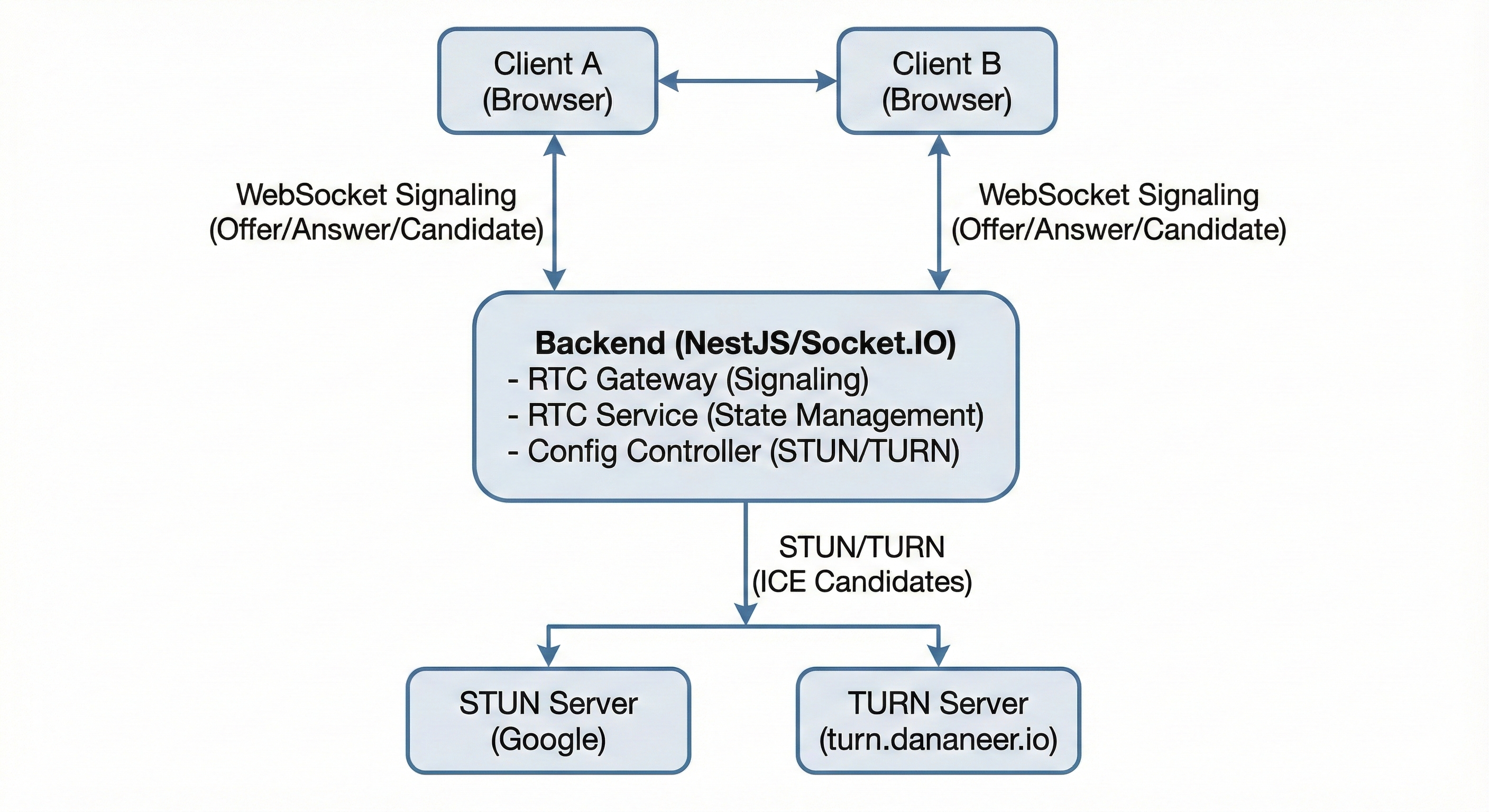
A TURN (Traversal Using Relays around NAT) server is a critical component for WebRTC applications. It acts as a relay server that forwards media traffic between peers when direct peer-to-peer connections are not possible due to network restrictions.
When is TURN needed?
- 4G/LTE mobile networks (carrier restrictions)
- 5G networks with strict NAT
- Corporate firewalls
- Symmetric NAT environments
- Restrictive network policies
How it works: When WebRTC cannot establish a direct connection, it automatically falls back to using the TURN server as an intermediary, ensuring reliable communication across all network types.
⚙️ Server Configuration
Domain
turn.dananeer.io
IP Address
165.22.71.105
Ports
- UDP:
3478- For fast LAN/WiFi connections - TCP:
3478- For moderate firewalls - TLS:
443- For 4G/5G and restrictive networks
Transport Types Supported
- UDP (User Datagram Protocol) - Fastest, lowest latency
- TCP (Transmission Control Protocol) - More reliable
- TLS (Transport Layer Security) - Most secure, works everywhere
🔧 Backend Configuration
Add these environment variables to your backend .env file:
# STUN servers (optional - defaults to Google STUN servers)
RTC_STUN_URLS=stun:stun.l.google.com:19302,stun:stun1.l.google.com:19302

# TURN servers - Include all three transport types for maximum compatibility
# Supports: 4G, 5G, Firewalls, Symmetric NAT, Corporate Networks
RTC_TURN_URLS=turn:turn.dananeer.io:3478?transport=udp,turn:turn.dananeer.io:3478?transport=tcp,turns:turn.dananeer.io:443?transport=tcp

# TURN server authentication (required if TURN_URLS is set)
RTC_TURN_USERNAME=dananeer_turn
RTC_TURN_CREDENTIAL=rZBSJ0z2mrDU4ja6j9DT5yPG

# Maximum participants per call (optional, default: 4)
RTC_MAX_PARTICIPANTS=4
📋 Configuration Details
RTC_STUN_URLS Optional
STUN (Session Traversal Utilities for NAT) servers for discovering public IP addresses.
Default: Google STUN servers are used automatically if not specified.
RTC_TURN_URLS Optional
TURN server URLs with transport types. Include all three for maximum compatibility:
turn:turn.dananeer.io:3478?transport=udp- For LAN/WiFiturn:turn.dananeer.io:3478?transport=tcp- For moderate firewallsturns:turn.dananeer.io:443?transport=tcp- For 4G/5G and restrictive networks
Default: Empty array (no TURN servers). Works for LAN/WiFi only.
RTC_TURN_USERNAME Required if TURN_URLS set
TURN server username for authentication.
Current value: dananeer_turn
RTC_TURN_CREDENTIAL Required if TURN_URLS set
TURN server password/credential for authentication.
Note: Keep this secure and never commit to version control.
RTC_MAX_PARTICIPANTS Optional
Maximum number of participants allowed in a WebRTC call.
Default: 4
Range: 2-10 (enforced automatically)
🌐 Network Support
This TURN server configuration supports all network types:
🔌 API Endpoint
Your backend exposes the RTC configuration via HTTP endpoint:
GET /api/v1/rtc/config
Authorization: Bearer <your_token>
Response:
{
  "turnUrls": [
    "turn:turn.dananeer.io:3478?transport=udp",
    "turn:turn.dananeer.io:3478?transport=tcp",
    "turns:turn.dananeer.io:443?transport=tcp"
  ],
  "turnUsername": "dananeer_turn",
  "turnCredential": "rZBSJ0z2mrDU4ja6j9DT5yPG",
  "stunUrls": [
    "stun:stun.l.google.com:19302",
    "stun:stun1.l.google.com:19302"
  ],
  "maxParticipants": 4
}
💻 Frontend Usage
In your frontend WebRTC code, fetch the configuration and use it:
const config = await fetch('/api/v1/rtc/config', {
  headers: { Authorization: `Bearer ${token}` }
});

const pc = new RTCPeerConnection({
  iceServers: [
    ...config.stunUrls.map(url => ({ urls: url })),
    ...config.turnUrls.map(url => ({
      urls: url,
      username: config.turnUsername,
      credential: config.turnCredential
    }))
  ]
});